Comparison
The locked album in Photos, or a vault app?
Use the locked album in Photos when you want pictures off the grid and nothing new to install or remember. Use a vault app when you want a code your iPhone passcode doesn’t open, pictures out of the Photos library, or documents and notes kept with them. From iOS 16, Photos keeps its album for set-aside photos, and Recently Deleted, locked by default: they open with Face ID, Touch ID or your iPhone passcode. A vault asks for more of you: an app, a second code and a recovery key to keep.

On this page
The album and a vault, question by question
Each answer for the album links the Apple page it comes from. Each answer for Sealed comes from its code or its App Store listing.
| Question | Photos’ locked album | Sealed |
|---|---|---|
| Where the picture lives | Still in your Photos library, out of the Library view, other albums and the widget (Apple) | Your files never leave your iPhone unless you turn on iCloud backup or export them yourself. Each file gets its own random 256-bit key, and that key is sealed with your vault key. |
| What opens it | Face ID, Touch ID or your iPhone passcode (Apple’s guide) | You can open Sealed with Face ID or Touch ID, a 4-, 6- or 9-digit passcode, a password or a pattern. |
| Your iPhone passcode | Opens it | Sealed has a passcode of its own, a gate inside the app that is separate from your iPhone passcode. With plain Face ID unlock on, someone who knows your iPhone passcode can open Sealed through the Face ID prompt. Dual Lock asks for your passcode and a Face ID match together, and it is part of Sealed Pro. |
| An app with Full Access | Apple’s privacy page says yes; its developer documentation says not while locked | Sealed imports only the photos and videos you choose, and deletes the originals in Photos only when you ask. Sealed encrypts every file with AES-256-GCM before it is saved. |
| Your other devices | With iCloud Photos on, it moves on all of them, and iCloud.com shows it after sign-in (Apple) | Files, names, notes and record fields are encrypted on your iPhone before they are uploaded, so iCloud receives only ciphertext. Other devices join your backup with your recovery key. |
| If you forget the way in | Nothing extra to forget: your iPhone’s unlock is the key (Apple’s guide) | If you forget your passcode, your recovery key lets you set a new one. Because your key never reaches us, we cannot recover your vault or reset your passcode for you. |
| What it holds | Photos and videos (Apple) | On the free plan you can add photos. Videos, documents, notes and records need Sealed Pro. Records keep logins, 2FA codes, credit cards, bank accounts, IDs and passports, Wi-Fi networks, recovery codes, license keys, contacts and custom fields. |
| Where it runs | iPhone, iPad, Mac and Apple Vision Pro, off by default on a Mac (Apple) | Sealed runs on iPhone and iPad. |
| Cost | Part of Photos (Apple) | Sealed is free to download, and Sealed Pro is an optional in-app purchase. The free plan holds up to 100 photos. |
Pick by what worries you
Someone scrolls through your camera roll. The album fits. Once moved, a picture is out of the Library and the widget, and the album asks before it opens.
Someone knows your iPhone passcode. The album can’t help: that passcode opens it. A vault helps only when its own code is the way in. If you open the vault with Face ID, iOS lets the device passcode stand in for your face. Dual Lock asks for your passcode and a Face ID match together, and it is part of Sealed Pro.
An app has Full Access to your library. Apple’s privacy page and its developer documentation disagree on whether such an app can read the album, so don’t lean on either. A vault keeps its copy outside the library that apps read, but the original stays in Photos until you delete it.
You want the pictures on every Apple device without doing anything. The album fits. A vault on one iPhone stays on that iPhone until you restore its backup on another one.
You want documents, card numbers or notes beside the pictures. A vault fits, and in Sealed that is part of Pro. The album holds pictures and videos only.
You want nothing new to remember. The album fits. A vault adds a code and a recovery key, and losing both means losing the vault.
When the album is the better choice
- It is already there, on your iPhone, iPad and Mac, with nothing to install or move (Apple’s article).
- It costs nothing, for photos and videos alike.
- It can’t be lost to a forgotten code. Your iPhone’s own unlock opens it.
- It follows iCloud Photos. A picture moved on your iPhone is moved on your iPad and Mac too.
- It keeps one copy. Moving to a vault means a second copy until you delete the first, then a trip to Recently Deleted, where Apple keeps deleted photos for 30 days.
Before you pick any vault app, five questions to ask a photo vault is a short list to check it against. For the album’s limits in detail, read what the album’s lock stops.
Where Sealed helps, and where it doesn’t
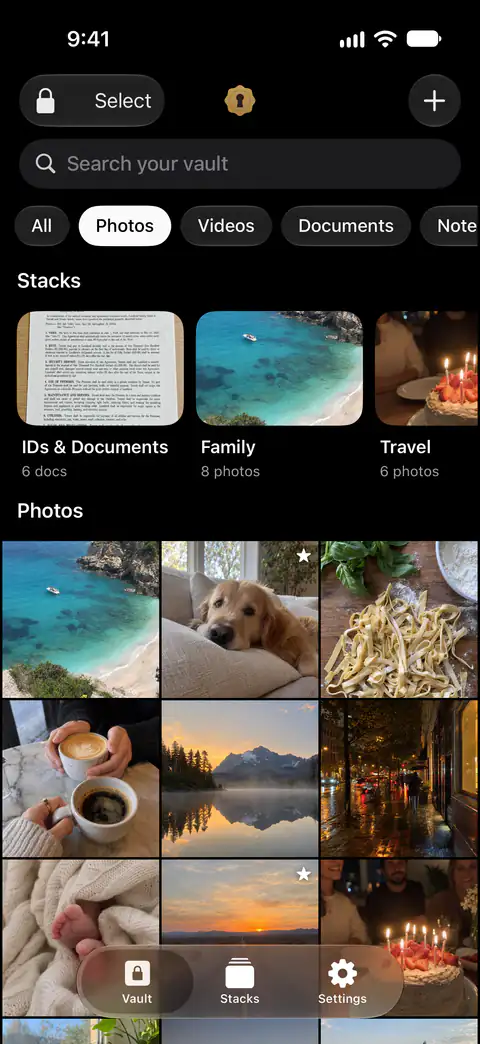
It helps when the pictures need a code of their own, with documents, notes and records kept beside them. Sealed has a passcode of its own, a gate inside the app that is separate from your iPhone passcode. Records keep logins, 2FA codes, credit cards, bank accounts, IDs and passports, Wi-Fi networks, recovery codes, license keys, contacts and custom fields.
It doesn’t always shut out your iPhone passcode. With plain Face ID unlock on, someone who knows your iPhone passcode can open Sealed through the Face ID prompt.
It doesn’t remove the originals unless you ask it to. Until you delete them, the originals stay in Photos, outside the vault.
It doesn’t hold videos, documents, notes or records on the free plan. On the free plan you can add photos. Videos, documents, notes and records need Sealed Pro.
It doesn’t run on a Mac or the web. Sealed runs on iPhone and iPad.
It can’t let you back in without your passcode or your recovery key. Because your key never reaches us, we cannot recover your vault or reset your passcode for you.
Sources
What this page says about Sealed was checked against the app on .
- Apple Support, the Hidden album in Photos (article 104987) — published March 16, 2026, read 13 Nov 2026; where moved photos stop showing, the lock by default, iCloud Photos, the devices that have the album
- Apple iPhone User Guide, delete photos and videos or move them out of the Library (iOS 27) — read 13 Nov 2026; Face ID, Touch ID or your passcode; the switch that turns the lock off
- Apple Support, If you’re missing photos or videos in the Photos app (article 118558) — published April 29, 2026, read 13 Nov 2026; the album on iCloud.com
- Apple Legal, Photos & Privacy — dated 2025-12-12, read 13 Nov 2026; what Allow Full Access gives an app
- Apple Developer Documentation, PHAsset.isHidden — read 13 Nov 2026; what the system returns to an app while the lock is on
- Apple Developer Documentation, LAPolicy.deviceOwnerAuthentication — read 13 Nov 2026; biometry first, the device passcode as the fallback
- Apple Support, Delete photos on your iPhone or iPad (article 104967) — published March 31, 2026, read 13 Nov 2026; Recently Deleted keeps photos for 30 days
- Sealed on the App Store — the listing, including the price and the privacy label
Get Sealed
Sealed is free to download, and Sealed Pro is an optional in-app purchase.

Sealed: Private Photo Vault
Sealed is free to download, and Sealed Pro is an optional in-app purchase.