Feature
Break-in alerts: what Sealed records, and what it can’t
With Break-In Alerts and Capture Photo on, the wrong try that starts a wait makes Sealed take three front-camera photos about three and a half seconds apart, and the screen flashes white to light the first one. A break-in photo is encrypted like everything else and opens only after you unlock, and the location saved with it never leaves the phone. Break-in alerts are off until you turn them on, and the photo also needs camera permission. Break-in alerts are part of Sealed Pro.

On this page
What happens, step by step
- You turn it on. In Settings, under Break-In Report, Break-In Alerts has separate switches for Capture Photo and Record Location, each asking for its own permission, and you choose after how many wrong tries in a row the wait and the photos start, from 1 to 10, with 3 as the default.
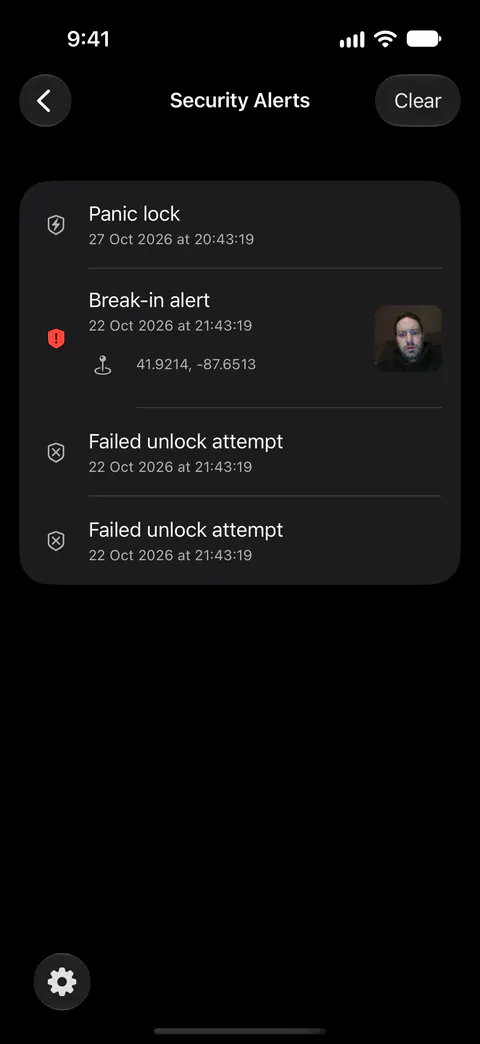
- Someone enters wrong passcodes. Unless you change the limit, the first wait starts at the third wrong try in a row. A Face ID or Touch ID attempt that doesn’t match counts as a wrong try, but cancelling the prompt, or iOS cancelling it, does not. While Break-In Alerts is on, every wrong try is saved as a failed unlock attempt with its date and time.
- The wait begins, and the photos are taken. With Break-In Alerts and Capture Photo on, the wrong try that starts a wait makes Sealed take three front-camera photos about three and a half seconds apart, and the screen flashes white to light the first one. The screen flashes white only when a photo is about to be taken, and then turns black and shows the countdown.
- Sealed takes one location. Sealed takes one location fix for the whole burst, asks for about a hundred meters of accuracy, and leaves the location out if location isn’t allowed or no fix arrives within 8 seconds.
- You look at them after you unlock. Once Break-In Alerts is on, Settings, under Break-In Report, has a Security Alerts list with each break-in alert, its photo and its location, and tapping the location opens Apple Maps.
The wait that comes with it
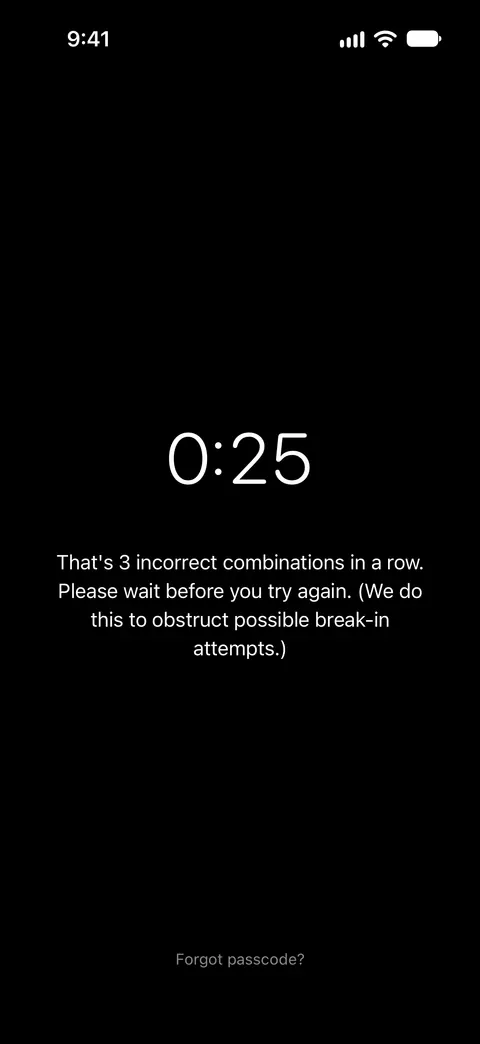
The wait is part of every vault: it doesn’t need Break-In Alerts or Sealed Pro. It grows with each wrong try:
| Wrong try | Wait |
|---|---|
| The one that reaches the limit | 30 seconds |
| The next one | 1 minute |
| The one after | 5 minutes |
| The one after that | 15 minutes |
| Every one after that | 60 minutes |
During a wait Sealed refuses every way in, the right passcode and Face ID included, and doesn’t count those tries as wrong. Sealed keeps the wrong-try count and the wait when you close it and open it again, and the count clears only after a correct unlock or a passcode reset with your recovery key. What that adds up to for a stranger guessing is on how long a passcode takes to guess. Forgot passcode? with your recovery key works during a wait, because a wait protects nothing against a 256-bit key.
Where the photos are kept
A break-in photo is encrypted with your vault key like any vault file, and its location is sealed with a second key that Sealed can read while the vault is locked, because the fix is saved at the moment of the attempt.
Break-in photos and their locations stay on the iPhone: they are not part of your iCloud backup and never reach us. With Maximum Security on, the vault key isn’t available while the vault is locked, so Sealed stores each break-in photo encrypted to a Secure Enclave public key and seals it into the vault the next time you unlock.
Anyone who can open your real vault can clear the alerts and their photos, after one confirmation, and it can’t be undone.
If a photo or a place is missing
When no photo can be taken, the alert is still saved and says why, for example that photo capture is off or that the camera isn’t allowed.
A photo needs camera permission and a place needs location permission, and both stay under your control. In iOS you can turn an app’s camera access on or off in Settings, under Privacy & Security, then Camera. In iOS you can review or change an app’s location access in Settings, under Privacy & Security, then Location Services.
Where Sealed helps, and where it doesn’t
It helps you find out that someone tried, see what the front camera saw, and make each further try cost more time. Break-in alerts take a short burst of front-camera photos after wrong passcodes, and note where it happened.
It doesn’t do these things:
- Warn you while it happens. Sealed sends no notification when someone tries a wrong passcode: the only notifications it builds are the free-trial reminder, the day a time-sealed stack opens, the monthly checkup reminder and a finished privacy sweep, and it has no push server of its own. You find an alert in Settings after you unlock.
- Stop anyone. It records and it slows. A right passcode takes no photo, even one that has been watched, and neither does the decoy passcode: see the decoy vault page.
- Photograph every wrong try. The photos come with the wait. The tries before it are logged with their time, without a photo. While Break-In Alerts is on, every wrong try is saved as a failed unlock attempt with its date and time.
- Go unnoticed. The white flash is visible by design, and Apple says iOS shows a green indicator whenever an app uses the camera. The person trying may notice either one.
- Show more than the front camera saw. A person can turn the phone away or cover the lens, and then the photos show that. Break-in alerts take a short burst of front-camera photos after wrong passcodes, and note where it happened.
- Keep the alerts if the phone is lost or erased. Break-in photos and their locations stay on the iPhone: they are not part of your iCloud backup and never reach us. They go where the phone goes.
Questions and answers
Does Sealed alert me when someone tries my passcode?
Sealed sends no notification when someone tries a wrong passcode: the only notifications it builds are the free-trial reminder, the day a time-sealed stack opens, the monthly checkup reminder and a finished privacy sweep, and it has no push server of its own. A break-in photo is encrypted like everything else and opens only after you unlock, and the location saved with it never leaves the phone.
Are break-in photos part of my iCloud backup?
Break-in photos and their locations stay on the iPhone: they are not part of your iCloud backup and never reach us.
Why does an alert have no photo?
When no photo can be taken, the alert is still saved and says why, for example that photo capture is off or that the camera isn’t allowed. In iOS you can turn an app’s camera access on or off in Settings, under Privacy & Security, then Camera.
Sources
What this page says about Sealed was checked against the app on .
- Sealed on the App Store — the listing, which names break-in alerts and the escalating wait
- Apple Support, Control access to hardware features on iPhone — camera permission, and the green indicator iOS shows when an app uses the camera
- Apple Support, Control the location information you share on iPhone — location permission for an app
Get Sealed
Sealed is free to download, and Sealed Pro is an optional in-app purchase.

Sealed: Private Photo Vault
Sealed is free to download, and Sealed Pro is an optional in-app purchase.