Feature
The Padlock: four or six wheels
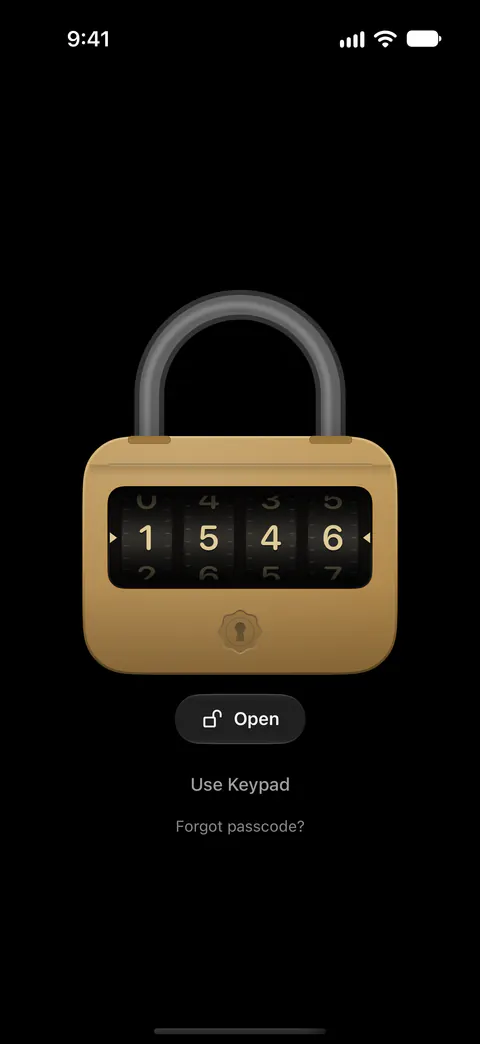
The Padlock has four wheels for a 4-digit passcode or six wheels for a 6-digit passcode. Vault Dial and Padlock let you open your vault by turning a combination, and they are part of Sealed Pro. Six wheels give a stranger a hundred times more to try than four, for a second or two more rolling.

On this page
A luggage lock, made of brass
The Padlock has four wheels for a 4-digit passcode or six wheels for a 6-digit passcode.
Think of the small combination lock on a suitcase zip. A row of wheels, one digit showing on each through a little window. Roll each wheel with your thumb until the row reads your code, then tap Open. The shackle springs only when the whole combination is right: no wheel tells you on its own that it is correct.
How many wheels you get
The wheels follow your passcode, so the lock and the code never disagree.
| Your passcode | Wheels on the Padlock |
|---|---|
| Four digits | Four |
| Six digits | Six |
| Nine digits, or a password | None: change the passcode, or use another style |
Sealed’s default passcode is 6 digits, and you can choose 4 or 9 digits or a password instead. So if you kept the default, you will see six wheels.
You can also choose the count on the Padlock’s page in Settings. On the Padlock’s page you can pick four or six wheels, and a number of wheels that doesn’t match your passcode makes a new combination of that length your passcode. Before a lock screen’s setup replaces your passcode, an alert titled Change Passcode says which decoy or duress passcode goes with it, and you can cancel.
Why the extra two wheels pay off
Every wheel you add multiplies the combinations by ten. Four wheels hold ten thousand. Six hold a million.
The waits after wrong tries turn that gap into a long stretch of time. At that pace, trying every possible 4-digit passcode takes about 14 months. At that pace, trying every possible 6-digit passcode takes about 114 years.
Two more wheels cost you a second or two each time you open the vault. For most people that is a fair trade.
Rolling with care
- Roll from left to right, one wheel at a time, the way you read the code.
- Check the whole row before you tap Open. A wheel that slipped by one makes a wrong try.
- Go slowly near your digit. A wheel rolls past easily when you flick it.
Keypad or wheels only
By default a Use Keypad button sits under the padlock, for the days rolling is a chore. A Padlock Only switch, under Passcode & Unlock in Settings, takes the button away so the wheels are the only way to enter the code. Your face or fingerprint, and a pattern if you set one, still work. Turn it on only once you can roll your code without thinking.
Getting it on your lock screen
- To choose a lock screen, open Settings, then Passcode & Unlock, and tap Lock Screen: each style has its own page to try it on, with a Use This Lock Screen button.
- Swipe to the Padlock and roll a practice combination until the wheels feel right.
- Pick four or six wheels, then tap Use This Lock Screen. If the count matches your passcode, you are done.
- If it doesn’t, roll a new combination, then roll it again to confirm. It becomes your passcode.
Where Sealed helps, and where it doesn’t
It helps you open the vault by feel, with a lock that looks like what it does. The Padlock has four wheels for a 4-digit passcode or six wheels for a 6-digit passcode.
It doesn’t do these things:
- Make a short code long. Every lock screen style is another way to enter your passcode, so it changes how you enter it and not how many combinations it has. Choose six digits for six wheels.
- Take every passcode. Nine digits and passwords need another style. The Rotary page covers one.
- Shield a combination someone watched. It opens for anyone who rolls the right digits. Break-in alerts react only to wrong tries.
Questions and answers
How do I get six wheels instead of four?
On the Padlock’s page you can pick four or six wheels, and a number of wheels that doesn’t match your passcode makes a new combination of that length your passcode. Before a lock screen’s setup replaces your passcode, an alert titled Change Passcode says which decoy or duress passcode goes with it, and you can cancel.
Can the Padlock take a nine-digit passcode or a password?
No, only four or six digits. Change your passcode first, or pick Rotary, which takes any number code. The Padlock has four wheels for a 4-digit passcode or six wheels for a 6-digit passcode.
Can I stop the keypad from showing under the padlock?
With the Vault Dial or the Padlock, a Dial Only or Padlock Only switch takes the keypad away, so the wheels are the only way to enter your passcode, while Face ID or Touch ID and a pattern still work.
Sources
What this page says about Sealed was checked against the app on .
- Sealed on the App Store — the listing, which names the Padlock among the lock screens
Get Sealed
Sealed is free to download, and Sealed Pro is an optional in-app purchase.

Sealed: Private Photo Vault
Sealed is free to download, and Sealed Pro is an optional in-app purchase.