Comparison
Private Photo Vault alternative with free backup to your iCloud
Sealed is one, and the biggest difference is the backup. Encrypted iCloud backup is free. Backup goes to your own iCloud account, not to a server of ours. The app you are leaving backs up only on Premium, to its own servers, behind an account and a password of its own, and its free version shows ads. Sealed has no ads and no tracking. The locks are much alike: both have a decoy, break-in photos and album locks, which in Sealed are Pro. The other app also runs on Android, and Sealed doesn’t.

On this page
Disclosure. Sealed is made by Loopware LLC. We read Private Photo Vault’s App Store listing, FAQ, Cloud Vault page and privacy policy on 13 November 2026, and did not install or test it. Our own App Store name is Sealed: Private Photo Vault, so on this page “Private Photo Vault” always means the app by Legendary Software Labs, sold as Private Photo Vault - Pic Safe.
What stays the same if you switch
On locks, the two apps are close. Private Photo Vault lists a passcode of its own (a PIN or a pattern), Face ID and PIN together, a decoy password, a location-based lock, a break-in report with a photo and GPS, passwords for single albums and a face-down lock (features page, listing).
Sealed has its own version of each. Sealed has a passcode of its own, a gate inside the app that is separate from your iPhone passcode. Sealed Pro adds privacy tools including the decoy vault, a duress passcode, break-in photos, Dual Lock, Location Lock, Maximum Security, locked stacks and seven lock screens. Sealed can lock when you shake the phone or set it face down. So you keep these tools if you move, but in Sealed most of them need Pro. Our page on the decoy vault shows how that one works.
What changes: where the backup lives
Private Photo Vault’s backup is Cloud Vault. Its listing says the free version does not back up to it, and its site says Cloud Vault needs Premium, an account and an internet connection. Your files go to the company’s servers after they are encrypted on your phone with a key made from a Cloud Vault password that is never uploaded. That password can’t be recovered by anyone (Cloud Vault page). With Cloud Vault off, its FAQ says the vault files stay on your phone, and an iCloud device backup may also hold copies of the encrypted files (FAQ).
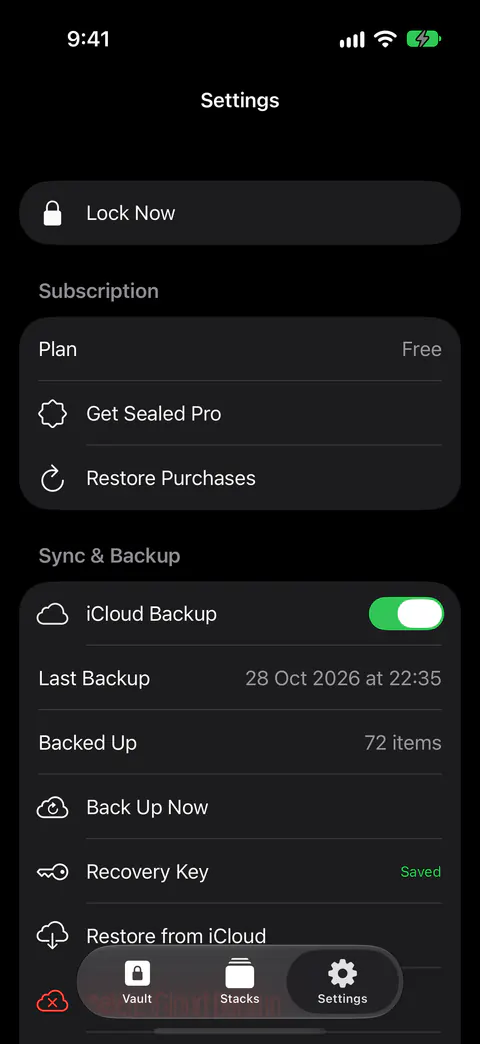
Sealed backs up on every plan instead. Encrypted iCloud backup is free. Backup goes to your own iCloud account, not to a server of ours. Files, names, notes and record fields are encrypted on your iPhone before they are uploaded, so iCloud receives only ciphertext. Sealed keeps its encrypted files out of your iPhone’s own backups, because the key never leaves this iPhone and a copy in a phone backup would not open on a new phone.
Both designs have the same hard edge: lose the one thing that opens the backup and it stays closed. In Private Photo Vault that is the Cloud Vault password (Cloud Vault page). In Sealed it is the recovery key. The recovery key is the only way to decrypt an iCloud backup on a new iPhone. Because your key never reaches us, we cannot recover your vault or reset your passcode for you.
What changes when a paid plan ends
Private Photo Vault’s Cloud Vault page says the Cloud Backup is deleted when you switch to Basic, while the photos in the app stay (Cloud Vault page).
Sealed works differently. If your Sealed Pro plan ends, backup keeps running. Only taking files off your iPhone is part of Sealed Pro: bringing files back from iCloud never is, even if your plan ends. Viewing and exporting your own photos is always free.
What changes: ads and data
Private Photo Vault’s privacy policy says the app displays advertisements and may share a device id or IP address with marketing partners to show targeted ads. It also says your photos and videos are not shared with those partners (privacy policy). Its App Store privacy label lists Usage Data as data used to track you, and Photos or Videos among data linked to you (store page). The developer fills in that label and Apple doesn’t check it.
Sealed has no ads and no tracking. Sealed contains no analytics or tracking SDKs, and it collects no data. Our guide to which photo vault apps collect data reads the labels of other vaults too.
Where Private Photo Vault is ahead
- Android, with sync. Its site says it is free to download for iPhone and Android, and that Cloud Vault syncs photos and videos between them (Cloud Vault page). Sealed runs on iPhone and iPad.
- More devices. It runs on iOS 15.0 or later, and its store page also lists Macs with Apple silicon and Apple Vision (store page). Sealed needs iOS 17.0 or later.
- An email route back. A recovery email set up on first use can recover the app or album password (FAQ). If you forget your passcode, your recovery key lets you set a new one.
- A long record. It has been on the App Store since 2011, and its latest version came out on 12 November 2026 (listing). Sealed’s first release was version 1.0.
Moving across
- Export what you want to keep. Its delete-your-account page says to export your photos and videos before deleting anything (page), and its listing names export to the Photos app.
- Add them to Sealed and save your key. You can add photos from Photos, files from Files, and items from the share sheet of other apps. On the free plan you can add photos. Videos, documents, notes and records need Sealed Pro. The first time you save your recovery key, Sealed also turns on iCloud Backup, which is free. See moving photos into a vault app.
- Check before you delete. Its FAQ says deleting the app removes the photos stored in it from your phone (FAQ). Open a few in Sealed first. After you import photos, Sealed asks whether to delete the originals from Photos or keep them, and says that deleted originals move to Recently Deleted in Photos.
- Close the old account. Deleting the app does not cancel Premium, and it does not delete the Cloud Vault account. You do that in the app under Settings, then Cloud Vault (page). You can manage or cancel a subscription at any time in Settings, under your name, then Subscriptions.
Where Sealed helps, and where it doesn’t
It helps if you want a backup that doesn’t depend on a paid plan or an account. Encrypted iCloud backup is free. If your Sealed Pro plan ends, backup keeps running. Sealed has no account, so there is nothing to sign up for.
It helps if you don’t want ads or data collection in your vault. Sealed has no ads and no tracking. Sealed contains no analytics or tracking SDKs, and it collects no data.
It doesn’t run on Android or older iPhones. Sealed runs on iPhone and iPad. Sealed needs iOS 17.0 or later.
It doesn’t include the decoy, break-in photos or stack locks on the free plan. Sealed Pro adds privacy tools including the decoy vault, a duress passcode, break-in photos, Dual Lock, Location Lock, Maximum Security, locked stacks and seven lock screens.
It doesn’t reset a forgotten passcode by email. Because your key never reaches us, we cannot recover your vault or reset your passcode for you. Read what to do if you forget a vault passcode.
Questions and answers
Does Private Photo Vault back up for free?
No. Its listing says the free version does not back up your files to Cloud Vault, and its site says Cloud Vault needs Premium, an account and an internet connection. Encrypted iCloud backup is free.
What happens to the Cloud Vault backup if Premium ends?
Its Cloud Vault page says the Cloud Backup is deleted when you switch to Basic, while the photos in the app stay. If your Sealed Pro plan ends, backup keeps running. Only taking files off your iPhone is part of Sealed Pro: bringing files back from iCloud never is, even if your plan ends.
Can I move my photos from Private Photo Vault to Sealed?
Yes, through your camera roll: export them to Photos, then add them to Sealed. Delete the Cloud Vault account in the old app’s settings, because uninstalling alone leaves it. You can add photos from Photos, files from Files, and items from the share sheet of other apps. On the free plan you can add photos. Videos, documents, notes and records need Sealed Pro.
Sources
What this page says about Sealed was checked against the app on .
- Apple, Lookup record for Private Photo Vault - Pic Safe (id 417571834), US storefront — the App Store description, seller, version 30.0 released 12 Nov 2026, first release in 2011, iOS 15.0 or later. Read 13 Nov 2026
- Private Photo Vault - Pic Safe on the US App Store — the privacy label and the Compatibility section. Read 13 Nov 2026
- Private Photo Vault, FAQ — no account for the on-device vault, the recovery email, device backups, deleting the app. Read 13 Nov 2026
- Private Photo Vault, Cloud Vault — what Cloud Vault needs, how it encrypts, its password, and what happens when Premium ends. Read 13 Nov 2026
- Private Photo Vault, Features — the lock and alert features it lists. Read 13 Nov 2026
- Private Photo Vault, privacy policy (hosted by iubenda) — advertising and where photos can be stored. Read 13 Nov 2026
- Private Photo Vault, Delete your account — exporting first, subscriptions and the Cloud Vault account. Read 13 Nov 2026
- Sealed on the App Store — the listing for the app this page compares
Get Sealed
Sealed is free to download, and Sealed Pro is an optional in-app purchase.

Sealed: Private Photo Vault
Sealed is free to download, and Sealed Pro is an optional in-app purchase.