Guide
Forgot your photo vault password? What you can do
It depends on how the vault was built, and its help page usually says. If the app can email you a reset or send you your passcode, something besides you holds a way back in, so use it. If it can’t, only a key you saved can help. In Sealed: If you forget your passcode, your recovery key lets you set a new one. Because your key never reaches us, we cannot recover your vault or reset your passcode for you.

On this page
First, work out which kind of vault you have
A forgotten password is a different problem in each design. Answer these three questions, in order, about your vault.
First: does its lock screen or its help page offer a reset by email, or to send you the passcode?
- Yes. A way back exists, and you are not the only one who holds it. Use it now, and read why that matters below.
- No. Go to the next question.
Second: did you save a recovery key or phrase when you set it up?
- Yes. That is your way back. Sealed’s steps are below.
- No. Go to the last question.
Last: is the lock your iPhone passcode? That is how the locked albums in Photos work. From iOS 16, Photos keeps its album for set-aside photos, and Recently Deleted, locked by default: they open with Face ID, Touch ID or your iPhone passcode.
- Yes. The way back is Apple’s. Apple says that resetting an iPhone whose passcode you forgot permanently deletes all of its data and settings, and that you set it up again afterwards and restore from a backup if you have one.
- No. There may be no way back. Go to if you have no way back.
Vaults with a recovery email
Photo Vault: OrNET Lock it is one example. Its help center says that if you set up a recovery email in the app, the app can send your passcode to that address, and that without one there is no way to retrieve it (page last modified 14 April 2025, read 28 October 2026).
An app that can send you your passcode keeps the passcode, or a way to get it, somewhere other than your memory. That can be fine for what you keep there. It is worth knowing.
Why a reset by email matters
If a reset brings your existing photos back, your password was not the only thing between those photos and a way in. One of two things is true:
- Someone holds a key. The company, or the app on your phone, has something that opens the files without your password.
- The files were never locked by your password. The password was a gate in front of the app, and the files behind it were readable.
If the files are locked by a key that nobody else has, a reset can only give you a fresh start. Apple’s own lock for notes works that way. If you forget a notes password, Apple can’t help you open the notes you locked with it, and resetting the password does not open them either.
Neither design is wrong. A reset by email is a convenience you pay for with trust. Sealed’s design, so you can compare: Your vault key is a random 256-bit key. It is not made from your passcode. Your passcode is a gate in front of the app. It is not part of the key. Sealed has no account, so there is nothing to sign up for. So the way back is something you hold, not something we hold.
Resetting a forgotten Sealed passcode
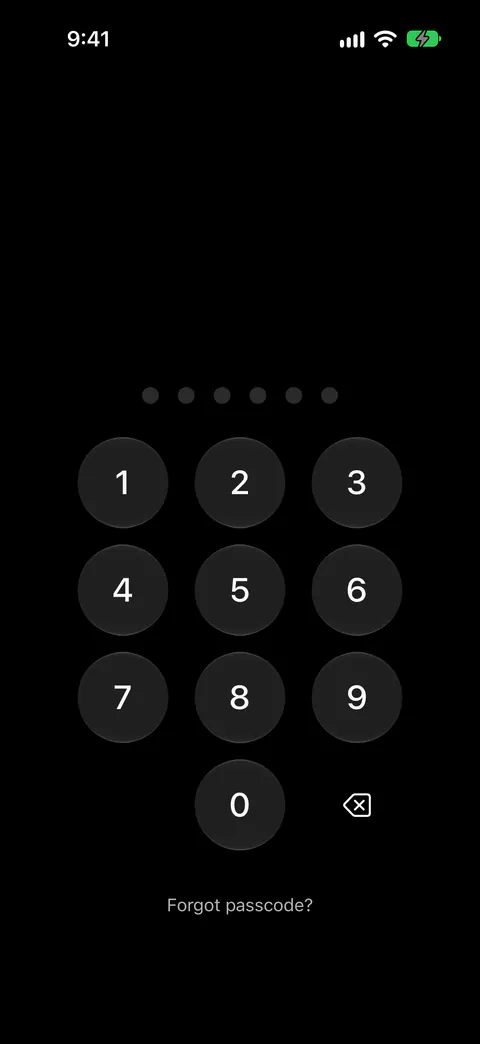
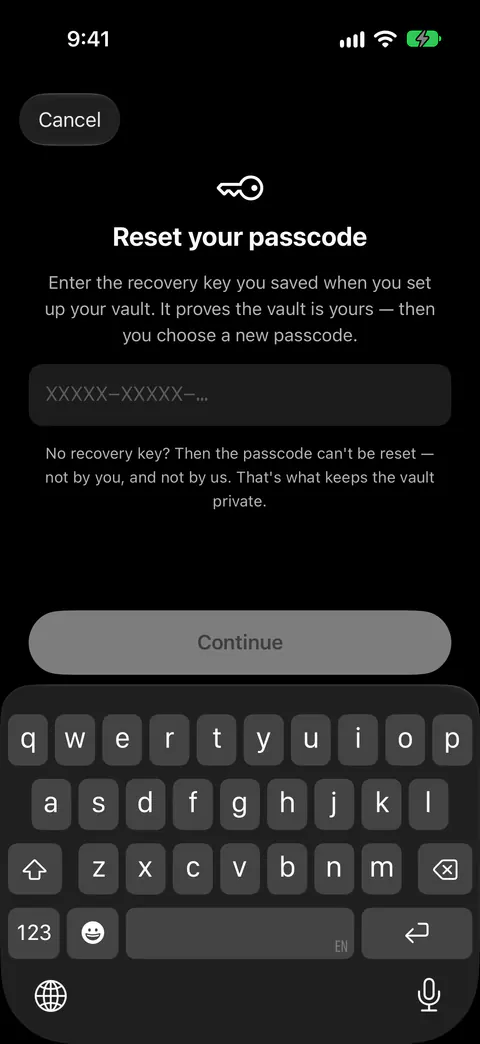
- Tap Forgot passcode? on the lock screen. On the lock screen, Forgot passcode? sits under the passcode pad. It asks for your recovery key, and once the key checks out you choose a new passcode.
- Type your recovery key. You can type the recovery key in capitals or lower case, with or without dashes and spaces, and Sealed tells you when what you typed is not a valid key. If you kept a sealed copy or gave parts to key guardians instead, use those here. The Forgot passcode? screen also takes a sealed copy of your recovery key with its phrase, or parts from your key guardians through Use guardian parts.
- Fix a refused key. If the recovery key you type on the reset screen belongs to a different vault, the screen says so. A wrong recovery key is not counted as a wrong passcode, and Forgot passcode? still works while Sealed is making you wait after wrong passcodes.
- Choose a new passcode and confirm it.
- Unlock with the new passcode. Resetting your passcode with the recovery key does not open the vault: you open it afterwards with the new passcode, and any extra lock you turned on still applies.
If Dual Lock keeps you out because your face can’t be checked, the same reset helps. If Dual Lock is what keeps you out because Face ID can’t be asked, the recovery key also switches Dual Lock off, and Sealed tells you so.
On a new or restored iPhone
A different screen appears when Sealed finds its data on a phone but not its key, for example after moving to a new iPhone. On an iPhone that has Sealed’s data but not its key, Sealed opens with a Welcome back screen that says your passcode and vault key stay on the iPhone where you made them, and asks for your recovery key. Once the recovery key is accepted on such an iPhone, Sealed opens the vault there and asks you to choose a new passcode. The new iPhone guide walks through it.
If you have no way back
- Stop guessing. By default, after three wrong passcodes in a row Sealed locks entry for 30 seconds, then for 1, 5, 15 and finally 60 minutes after each further wrong try. Other apps differ, so read the app’s help page before you try.
- Look for other copies. If you moved photos into the vault and deleted the originals, look in Recently Deleted. When you delete photos and videos in Photos, they go to its Recently Deleted album for 30 days, and after that they are permanently deleted. A computer or a shared album may hold more.
- Don’t count on a phone backup. Apple says an iCloud Backup includes app data for the apps you have downloaded, but data an app keeps in iCloud Drive is stored in iCloud instead of in the backup. For Sealed that doesn’t help. The folder where Sealed keeps its encrypted files is left out of iPhone backups, because the vault key never leaves the iPhone it was made on.
- Erase and start over, if you must. Without the recovery key, what is left of the vault on a new iPhone cannot be opened, by you or by us, and starting over erases it while anything in your iCloud backup stays there. Erasing doesn’t open the old backup either: that needs the recovery key too.
Never send your passcode or your recovery key to anyone, by email or in a chat, including a support address. Our support page says the same.
Where Sealed helps, and where it doesn’t
It helps because the way back is a key only you hold, and a wrong key costs you nothing. A wrong recovery key is not counted as a wrong passcode, and Forgot passcode? still works while Sealed is making you wait after wrong passcodes. Forgot passcode? with your recovery key works during a wait, because a wait protects nothing against a 256-bit key.
It helps if you set up a second way back in advance. A sealed copy locks your recovery key under a phrase only you know, so the copy can sit in your email or in Notes. Key guardians split your recovery key into 3 parts where any 2 bring it back, or into 5 parts where any 3 do, one part for each person you trust.
It doesn’t have a reset by email, because there is no account to email. Sealed has no account, so there is nothing to sign up for.
It doesn’t get you in without the key. Because your key never reaches us, we cannot recover your vault or reset your passcode for you.
It doesn’t protect a key you leave lying around. Anyone who has your recovery key and your iPhone or your iCloud backup can open your vault. Keep it out of shared notes and screenshot folders.
Questions and answers
Can Sealed reset my passcode if I forgot it?
Only with your recovery key, or a sealed copy of it, or your key guardians' parts. On the lock screen, Forgot passcode? asks for your recovery key, and once the key checks out you choose a new passcode. Resetting your passcode with the recovery key does not open the vault: you open it afterwards with the new passcode, and any extra lock you turned on still applies.
Does a reset by email mean a vault is not private?
Not by itself, but it tells you something. If a reset gets your existing photos back, your password was not the only thing between those photos and a way in: either someone holds a key, or the files were never locked by your password. Ask which. Your passcode is a gate in front of the app. It is not part of the key.
Do wrong recovery keys count as wrong passcodes?
A wrong recovery key is not counted as a wrong passcode, and Forgot passcode? still works while Sealed is making you wait after wrong passcodes.
What if I forgot my passcode and have no recovery key?
Without the recovery key the passcode can’t be reset, not by you and not by us, and the reset screen says so. Because your key never reaches us, we cannot recover your vault or reset your passcode for you.
Sources
What this page says about Sealed was checked against the app on .
- Apple Support, How to lock or unlock notes on your iPhone or iPad — Apple’s own lock, and what it says about a forgotten password; cited through the ios.notes_no_recovery fact
- Apple Support, If you forgot your iPhone passcode, reset your device without a computer — what resetting an iPhone passcode erases; cited through the ios.forgot_passcode_erase fact
- Apple Support, What does iCloud back up? — app data in an iCloud Backup; cited through the ios.icloud_backup_app_data fact
- Photo Vault: OrNET Lock it, help center, How can I recover my passcode? — one vault app’s recovery email; the page was last modified on 14 April 2025, read 28 October 2026 (facts/competitors.yaml)
- Sealed on the App Store — the listing for the app this guide uses
Get Sealed
Sealed is free to download, and Sealed Pro is an optional in-app purchase.

Sealed: Private Photo Vault
Sealed is free to download, and Sealed Pro is an optional in-app purchase.