Feature
What happens to a photo in Sealed
Sealed encrypts a photo on your iPhone as soon as you add it, and keeps it encrypted on the phone, in its previews and in your backup. Each file gets its own random 256-bit key, and that key is sealed with your vault key. Sealed encrypts every file with AES-256-GCM before it is saved. What no vault can protect is a copy kept outside it, or a vault that someone opens the way you do.

On this page
Before you add it
In your camera roll, a photo is part of your library, and anything that reads the library can show it, including the apps you let in. Apple says you control whether third-party apps can access information in Photos, Contacts, Calendar and other apps, and Settings, under Privacy & Security, lists the apps that asked and lets you turn each one on or off. The guide to where private photos still show up goes through each place.
Sealed only sees what you pick. Sealed imports only the photos and videos you choose, and deletes the originals in Photos only when you ask.
The moment you add it
- It gets a key of its own. Each file gets its own random 256-bit key, and that key is sealed with your vault key.
- It is encrypted on the phone. Sealed encrypts every file with AES-256-GCM before it is saved. Large files are encrypted in chunks, and Sealed refuses a file that has been changed, reordered or cut short.
- Its name is sealed too. Names, notes and the fields of a record are sealed with your vault key too, not just the photos.
- iOS puts its own lock on the file. Sealed creates each encrypted file with iOS Complete Protection, which Apple calls Class A. Apple’s guide says that in this class, shortly after you lock the phone, “the decrypted class key is discarded, rendering all data in this class inaccessible”.
- The original stays where it was. Photos and videos are sealed the moment they arrive, and afterwards you can remove the originals from Photos if you like.
While you look at it
To show you a photo, the app has to decrypt it, and anyone who can see the screen can see the photo. Three things keep that moment short.
- The previews don’t outlive the session. Thumbnails are encrypted like the photos, and Sealed wipes the decrypted copies it shows in the grid when the vault locks.
- The vault closes behind you. Sealed locks as soon as you leave it unless you choose a delay, and it covers its contents in the app switcher.
- A recording sees a cover. Sealed covers its contents while the screen is being recorded or mirrored, and that is on by default.
When the vault locks
Locking puts the photo back the way it was saved: an encrypted file, with the readable copies gone. The key that opens it stays on this iPhone. Your vault key is kept in the iPhone Keychain, on this device only, and it can be read only while the phone is unlocked. The security page maps every key and lock in technical detail.
Without Maximum Security, the app can read your vault key whenever the phone is unlocked, because the key sits in the Keychain. Two options change that. Maximum Security ties the key to your face or fingerprint, and a vault passphrase ties it to a phrase you type at every unlock. Both are part of Sealed Pro.
When it goes to iCloud
The first time you save your recovery key, Sealed also turns on iCloud Backup, which is free. Files, names, notes and record fields are encrypted on your iPhone before they are uploaded, so iCloud receives only ciphertext.
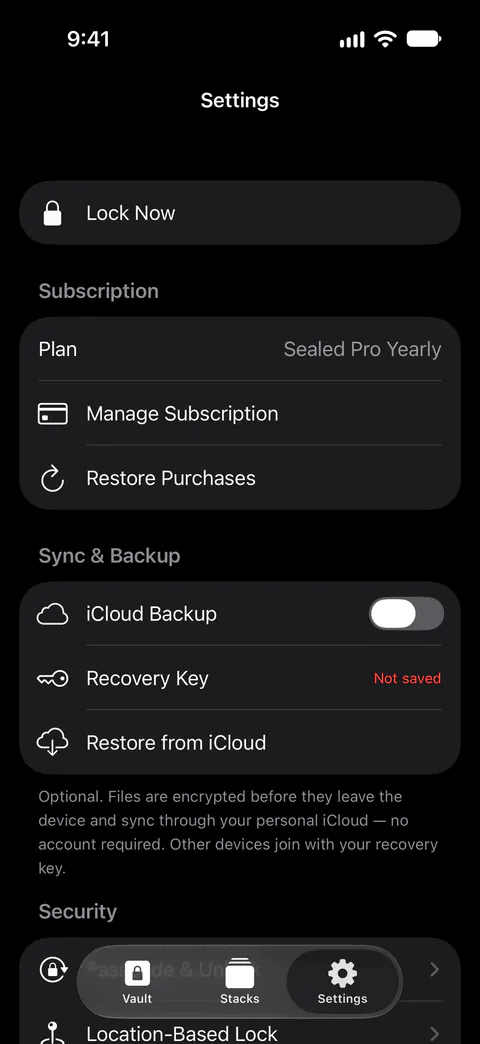
The copy is stored there but can’t be read there. A little about the backup itself still shows. Backup records have plain types such as VaultItem and SecureNote and random identifiers, so iCloud can see that a backup exists and roughly how many records it holds.
Your iPhone’s own backup is a different matter. Sealed keeps its encrypted files out of your iPhone’s own backups, because the key never leaves this iPhone and a copy in a phone backup would not open on a new phone. The backup page covers what goes in and what stays out.
When it reaches a new iPhone
Your vault key stays on the iPhone it was made on, so on a new iPhone Sealed asks for your recovery key. You can restore your vault on a new iPhone from your backup, with your recovery key. The photo is decrypted again only on the new phone, once your recovery key has opened the backup.
When it leaves the vault
Sealed saves items to your photo library only when you export them. Viewing and exporting your own photos is always free. An exported photo is an ordinary photo again, in the library with everything that reads it.
To send a photo to someone and keep it locked on the way, use an encrypted share. You can send someone an encrypted copy of an item that opens in Sealed with a passphrase you choose, and creating one is part of Sealed Pro.
Where Sealed helps, and where it doesn’t
It helps keep a photo readable only inside the vault: on the phone, on the screen while you look, and in your backup. Files, names, notes and record fields are encrypted on your iPhone before they are uploaded, so iCloud receives only ciphertext.
It doesn’t do these things:
- Keep out someone who opens the vault the way you do. Whoever has your passcode, or your face, gets in like you. Dual Lock asks for your passcode and a Face ID match together, and it is part of Sealed Pro.
- Stop a screenshot. Apple’s documentation says an app hears of a screenshot only “after the screenshot is taken”. Sealed warns you after you take a screenshot while a record’s values are showing, and it does not block screenshots.
- Stop a second camera. Sealed’s cover follows what iOS reports as a captured screen: screen recording, AirPlay and wired mirroring, and screen sharing. Apple’s documentation describes a captured screen as “recording, mirroring, or using AirPlay”, and a phone held up to the screen is none of those.
- Protect the original, or a copy you export. Until you delete them, the originals stay in Photos, outside the vault. What happens to it there is up to the Photos app: see are photos encrypted on iPhone.
- Bring the photo back without your recovery key. Because your key never reaches us, we cannot recover your vault or reset your passcode for you.
- Keep your vault if you delete the app while backup is off. If you delete Sealed from an iPhone while iCloud Backup is off, the vault on that iPhone is deleted with it.
Questions and answers
Can anyone at Sealed see my photos?
We run no server, so there is nothing of yours for us to see. Your vault key never reaches us. Sealed contains no analytics or tracking SDKs, and it collects no data.
What if someone copies the vault’s files off my iPhone?
They get encrypted files without the key that opens them. Your vault key is kept in the iPhone Keychain, on this device only, and it can be read only while the phone is unlocked. Sealed keeps its encrypted files out of your iPhone’s own backups, because the key never leaves this iPhone and a copy in a phone backup would not open on a new phone.
Does Sealed encrypt more than the photos?
Names, notes and the fields of a record are sealed with your vault key too, not just the photos. Thumbnails are encrypted like the photos, and Sealed wipes the decrypted copies it shows in the grid when the vault locks.
Sources
What this page says about Sealed was checked against the app on .
- Apple Platform Security, Data protection classes — Complete Protection, the class Sealed’s files use: shortly after the phone locks, the class key is discarded (published December 19, 2024; read 13 Nov 2026)
- Apple Developer Documentation, userDidTakeScreenshotNotification — an app is told about a screenshot only after it is taken (read 13 Nov 2026)
- Apple Developer Documentation, UIScreen.isCaptured — what iOS reports as a captured screen: recording, mirroring or AirPlay (read 13 Nov 2026)
- Sealed on the App Store — the listing, which describes the encryption and the backup
Get Sealed
Sealed is free to download, and Sealed Pro is an optional in-app purchase.

Sealed: Private Photo Vault
Sealed is free to download, and Sealed Pro is an optional in-app purchase.